Bhushan Nemade
·
Product teams run on Jira, It gives teams structure, traceability, and a shared system for execution. When you need to track who is building what and by when, Jira does that well.
Jira was built around a specific assumption: that the work is already defined. And the core product decisions have usually already been made: what to build, and what to push back.
Ferrix AI helps you to make these decisions by synthesizing customer signals, prioritizing opportunities, and turning approved decisions into execution-ready work through an agentic workflow.
Jira vs Ferrix AI: Quick Comparison
Ferrix AI | Jira | |
|---|---|---|
Core function | Helps in discovery, planning, and execution using an agentic workflow | Track, assign, and coordinate engineering execution once work has been defined. |
Product loop coverage | Operates on the decision layer before execution, then hands structured work off to Jira. | Picks up after decisions are made; structures the tracking layer. |
Customer Context | Agents continuously synthesize customer conversations, documents, and tools to surface what to build next. | Customer context has to be added to Jira manually as tickets, comments, or linked documents. |
Prioritization | Suggests priorities by analyzing patterns across feedback, severity, affected segments, and usage. PM reviews and approves. | Backlog ordering happens inside Jira, but the judgment on what's worth building is made elsewhere. |
Role of AI | AI agents are the core of the platform, operating across the full decision-to-execution loop. | Add-on automations layered onto a tracking system. |
How Jira and Ferrix AI Fit Into Different Layers of Product Workflow
The product workflow has two distinct layers. The first is the decision layer: understanding customer signals, spotting patterns, deciding what matters, and making trade-offs. The second is the execution layer: assigning work, tracking progress, and coordinating delivery
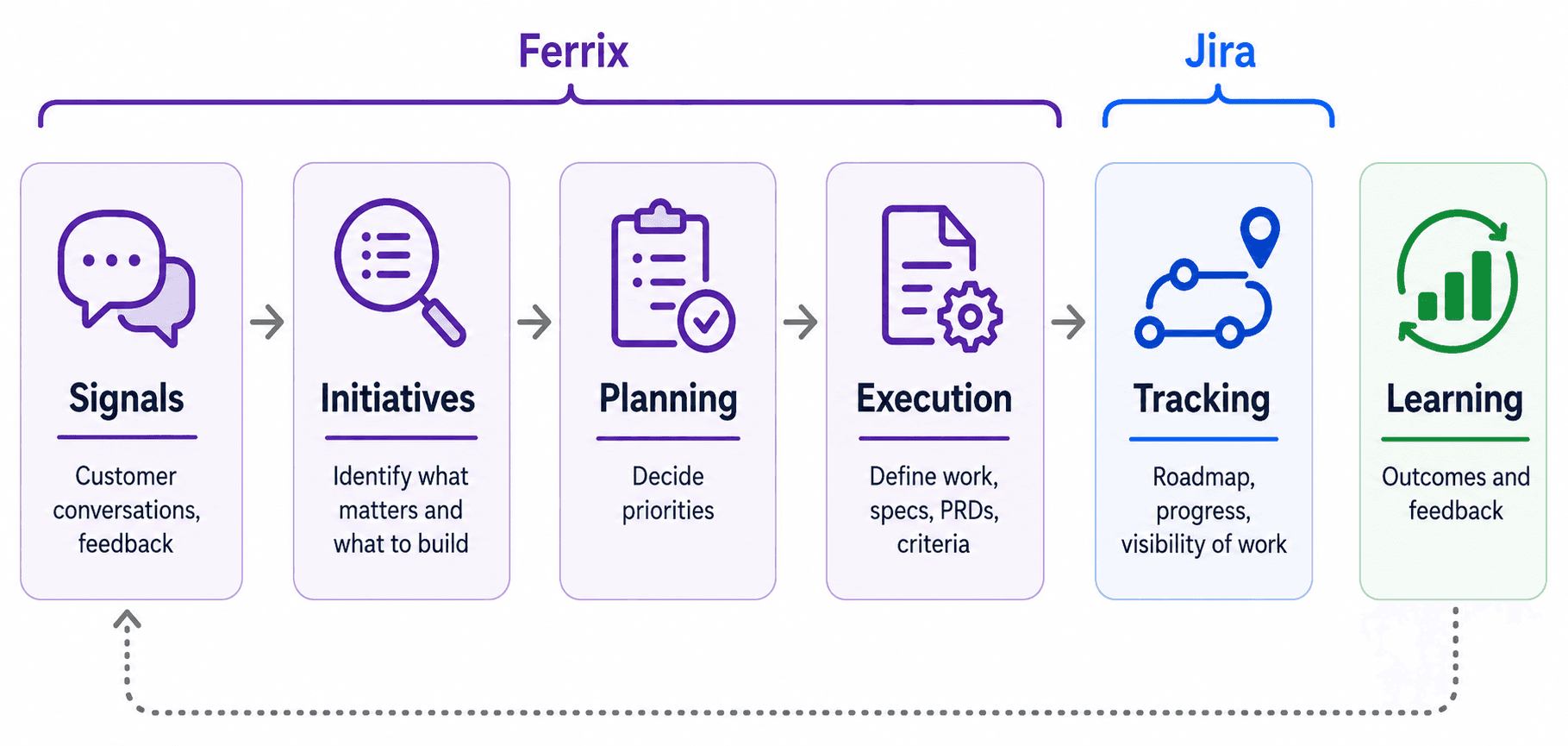
Jira fits at the second layer of the product workflow. Once a team knows what needs to be built, Jira provides the structure for that work. It helps teams track ownership, status, timelines, blockers, and handoffs across teams.
The first layer is continuous and unstructured. Product teams have to gather context from multiple sources, interpret signals, decide what is worth building, make trade-offs, and align stakeholders on priorities. This work is held together by the team’s attention, memory, and manual effort. This becomes a bigger problem as AI accelerates development speed. A wrong product decision no longer just causes delay. It quickly became a shipped feature in the market that no one wants
Ferrix AI works on the decision layer; it synthesizes your customer conversation and feedback across tools to identify what is worth building next. Agents weigh signals as feedback frequency, severity, affected segments, revenue impact, and product usage data to create a prioritized view of product opportunities. You review the output, adjust the priority, and approve what moves forward. Once approved, Ferrix AI agents turn that decision into specs, tickets, acceptance criteria, and release plans grounded in the same context.
What to Choose?
Use Jira when the work is already defined, and your team needs to plan, assign, track, and ship it.
Use Ferrix AI when your team needs to decide what should become work by synthesizing customer signals, prioritizing what matters, and turning approved decisions into execution-ready specs.
The best setup is not Ferrix AI instead of Jira. It's Ferrix AI before Jira. Ferrix helps you decide what to build. Jira helps you execute and track it. Together, they cover the full loop.
Frequently Asked Questions
What is the difference between Jira and Ferrix AI?
Jira is a project management tool that helps in issue tracking, sprint planning, and engineering execution. Ferrix AI works earlier in the product loop. It helps product teams synthesize customer signals, decide what is worth building, and turn approved decisions into specs, tickets, acceptance criteria, and release plans.
Does Ferrix AI replace Jira?
No, Ferrix AI and Jira complement each other by covering different parts of the product workflow. Ferrix AI helps teams decide what to build and shape the work clearly. Jira helps teams assign, track, and coordinate that work through delivery.
How does Ferrix AI handle customer context differently from Jira?
In Jira, customer context usually has to be added manually as tickets, comments, or linked documents. Ferrix AI continuously synthesizes signals from customer conversations, documents, tools, and feedback sources to surface patterns, priorities, and product opportunities before they become execution work.
How does Ferrix AI support prioritization compared with Jira?
Jira can help teams order and manage a backlog; teams have to do the prioritization manually. Ferrix AI supports decision-making by analyzing signals such as feedback frequency, severity, affected customer segments, usage context, and business impact. The PM reviews, adjusts, and approves what moves forward.